forked from DRAM-IT/Wiki

5.5 KiB
5.5 KiB
Computer Systems, Virtualization, and Linux Fundamentals
Target Audience: IT Professionals, System Administrators, or Developers
Prerequisites: Basic computer literacy. Pre-install VirtualBox and download CentOS/RHEL ISO (instructions sent prior).
Schedule Breakdown
Total Time: 8 Hours (Excluding Breaks)
1. Welcome & Overview (9:00 AM – 9:15 AM)
- Objective: Set expectations and outline the day.
- Activity:
- Quick introductions.
- Overview of training goals and schedule.
2. Lecture: Computer Systems & Network Fundamentals (9:15 AM – 10:15 AM)
- Topics Covered:
-
What is a Computer System?
- Hardware:
- CPU (Processor): The brain – what it does.
- GPU (Specific Processor): The brain – what it does.
- RAM (Memory): Short-term storage, faster speed access.
- Storage (HDD/SSD): Long-term storage, medium speed access.
- Motherboard: The central hub.
- Input/Output Devices (Keyboard, Mouse, Monitor, Printer).
- Software:
- Operating System (OS): The manager (Windows, macOS, Linux).
- Applications: Programs for specific tasks.
- Hardware:
-
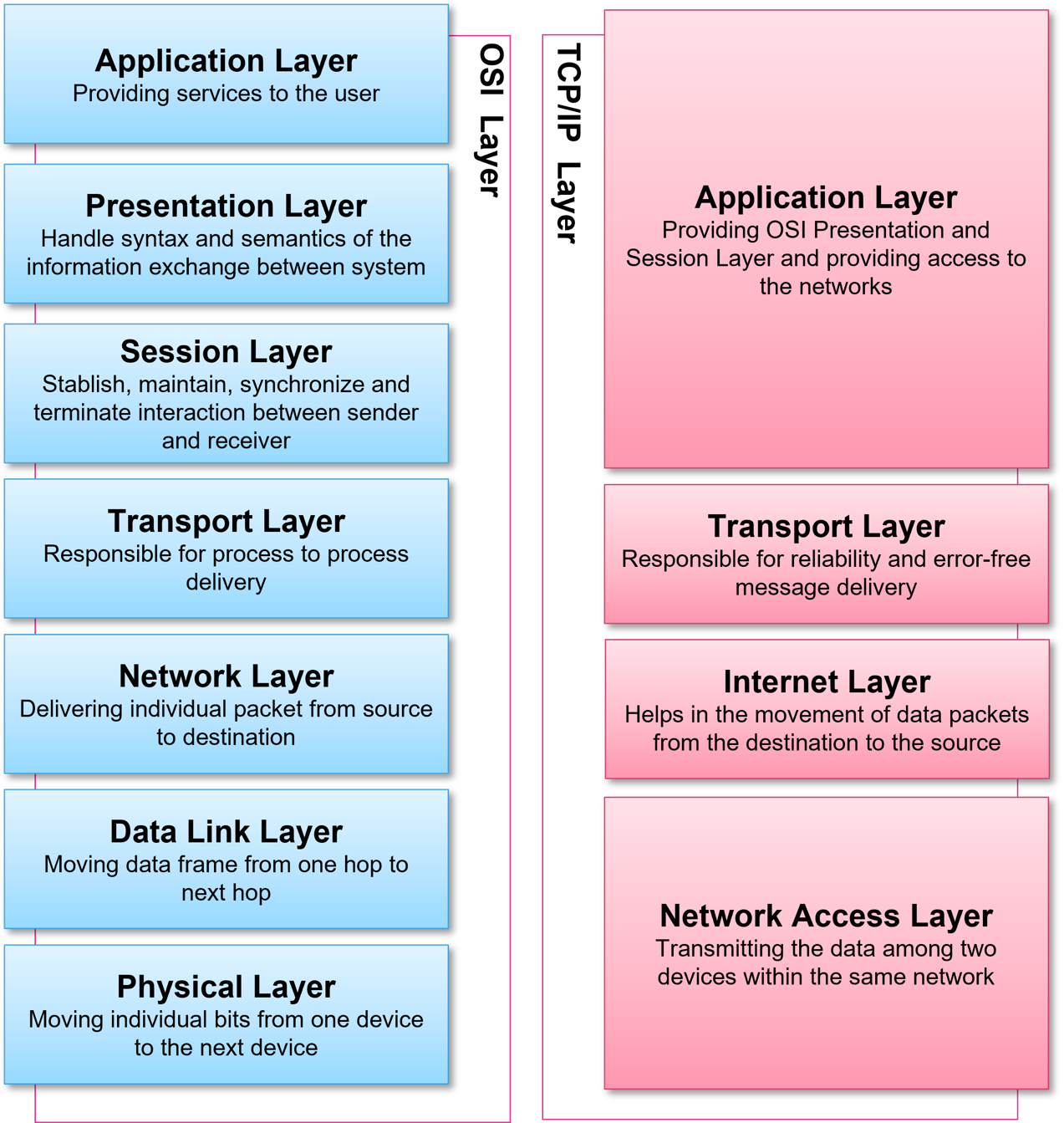
Basics of networking: IP addresses, DNS, DHCP, and subnets.
-
Role of OS in resource management.
-
- Learning Outcome: Understand how hardware and software interact in networked environments.
3. Lab 1: Basic Network Configuration (10:30 AM – 11:30 AM)
- Tools Used: Command-line (
ipconfig/ifconfig,ping,nslookup). - Activities:
- Check IP configuration and test connectivity.
- Modify network settings (temporary IP change).
- Troubleshoot a simulated DNS issue.
- Deliverable: Screenshot of successful
pingto a gateway and external domain.
4. Lecture + Group Activity: Bare Metal vs Virtualization vs Containerization (11:30 AM – 12:30 PM)
- Topics Covered:
- Bare Metal:
- Definition: OS directly on hardware.
- Pros: Maximum performance, direct hardware access.
- Cons: Resource underutilization, difficult to manage multiple applications, hardware dependency.
- Virtualization:
- Concept: Running multiple virtual machines (VMs) on a single physical host.
- Hypervisor (Type 1 vs. Type 2 - focus on Type 2 for VirtualBox): The software that manages VMs.
- Pros: Resource isolation, efficient resource utilization, portability, disaster recovery.
- Cons: Overhead from hypervisor, slightly lower performance than bare metal.
- Analogy: An apartment building (bare metal) vs. a shared house with separate rooms (virtualization).
- Containerization (Brief Overview - for context):
- Concept: Lightweight, isolated environments sharing the host OS kernel.
- Examples: Docker.
- Pros: Even lighter than VMs, faster startup, highly portable.
- Cons: Less isolation than VMs, shares host kernel.
- Analogy: Virtualization is a separate house for each family; Containerization is separate apartments within one house.
- Virtualization:
- Bare Metal:
- Definition: OS directly on hardware.
- Pros: Maximum performance, direct hardware access.
- Cons: Resource underutilization, difficult to manage multiple applications, hardware dependency.
5. Lunch Break (12:30 PM – 1:30 PM)
6. Demo + Lab 2: VirtualBox Setup & VM Creation (1:30 PM – 2:30 PM)
- Topics Covered:
- Purpose of VirtualBox (cross-platform VM management).
- System requirements (VT-x/AMD-V, 4GB+ RAM).
- Lab Steps:
- Install VirtualBox (if not pre-installed).
- Create a VM: Allocate resources (2 CPU cores, 4GB RAM, 20GB disk).
- Attach CentOS ISO and start installation (pre-loaded ISO).
- Deliverable: VM with CentOS installed (post-reboot).
7. Lecture: Linux Fundamentals (CentOS/RHEL) (2:45 PM – 3:30 PM)
- Topics Covered:
- History of Linux and key distributions (Debian vs RHEL).
- Why enterprises prefer CentOS/RHEL (long-term support, security).
- File system hierarchy (
/,/etc,/var,/home).
8. Lab 3: Linux Commands & File System (3:30 PM – 4:15 PM)
- Activities:
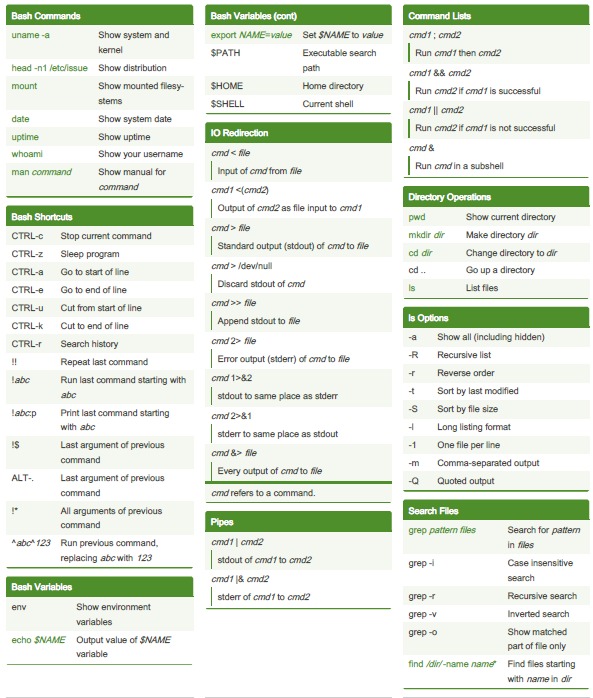
- Navigate directories using
cd,ls,pwd. - Create files (
touch,nano), directories (mkdir). - Archive files with
tarand search usinggrep.
- Navigate directories using
- Deliverable: A compressed log file containing specific error entries.
9. Lab 4: User Permissions & Final Challenge (4:15 PM – 5:00 PM)
- Activities:
- Create users/groups (
useradd,groupadd). - Modify permissions (
chmod 755,chown). - Final Lab:
- SSH into a VM, create a secure directory for a team, and set permissions.
- Create users/groups (
- Deliverable: A shared folder accessible only to the
developersgroup.
10. Wrap-Up & Q&A (5:00 PM – 5:30 PM)
- Activity:
- Recap key takeaways.
- Distribute lab solution guides and additional resources.
- Open floor for questions and feedback.
Training Materials Provided:
- Slide decks for lectures.
- Step-by-step lab guides with commands.
- Pre-configured CentOS VM template (for slower learners).
- Cheat sheets for Linux commands and VirtualBox shortcuts.
Instructor Notes:
- Emphasize hands-on troubleshooting during labs.
- Encourage peer collaboration for complex tasks.
- Adjust time allocations based on group pace.
This plan balances theory and practice, ensuring participants gain actionable skills in virtualization and Linux administration.